
How to Shop
Shopping here is really easy. There's just a few things you need to know.
1. Select your product.
2. Choose your options.
3. Add to cart.
4. Checkout.
1. Select your product.
You can choose products directly from the Shop All page, or you can go to the page of the category you want directly, by hovering over the link tree in the navigation bar at the top of each page.

2. Choose your options.
Select the options based on the criteria on the page. For instance, size and color choices. The Color List appears at the bottom of every item page. You can choose any color or combination of colors (if applicable) from this list. You can even pick the same color multiple times, if you wanted to. We do ask that you specify each item when selecting colors
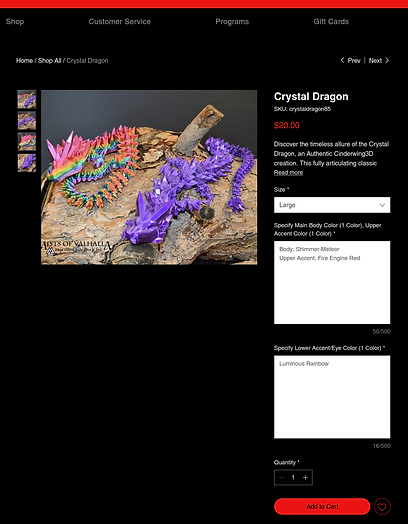
Specify each part, like this:
Body: Shimmer-Meteor
Upper Accent: Fire Engine Red
Choose your Size
3. Add to cart.
Once you've selected your options, enter the quantity you'd like to purchase in the quantity box. It defaults to 1. After you're done, click the red "Add to Cart" button. The item with all the chosen options will be added to your cart for checkout.

Set your desired quantity
Click the button
4. Checkout.
When you've finished adding all of the items you want to your cart, you can click on the cart icon in the upper right of your screen, and it will open the side cart. Click on the "View Cart" button to start the checkout process. On the Cart page, you can choose your shipping options and enter promo codes and notes to the Production Team. When you've chosen all your options, click on the red "Checkout" button on the bottom of the page. Enter all of your shipping and billing information, then click the blue "Place Order & Pay" button when you're ready.

Enter Promo Codes & Notes
Choose shipping
If you still need help, feel free to reach out to us at support@mistsofvalhalla.net.